Personalized Filter Designer
Please put on your headphones and follow the personalization guide
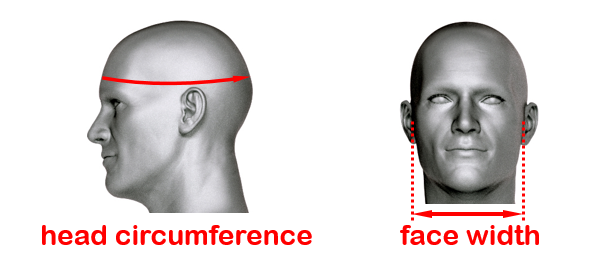
Choose your hat size or measure your head circumference using a tape measure
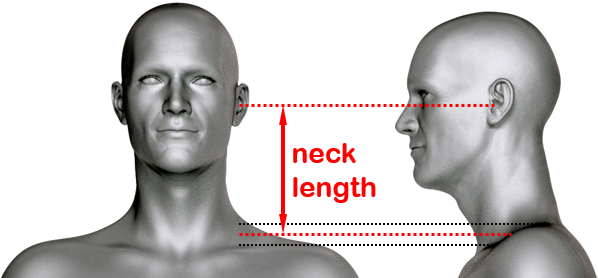
The neck length can be measured in front of a mirror using a ruler
HELP
Select a front CHANNEL and find the correct ear shape by listening: the virtual speakers should be located at eye level. Focus on the location only and neglect other sound aspects.
Step 1: select STEREO and find the correct setting for the center of the soundstage.
Step 2: select LEFT and RIGHT to confirm the setting for the side of the soundstage.
If in doubt, choose the higher ear shape number (smaller ear width).
Kindly note that the ear shape personalization concerns the front channels only.
- You may also measure the ear width with the help of someone using a ruler or set square as described below.
- The measuring points depend on the visibility of the ear canal as seen from the side: are they visible (left picture) or hidden by the Tragus (right picture)?
- Measure both ears and round each result to the nearest millimeter / 16ths of an inch and select the size that fits both ears.
- Confirm the correct setting by listening and also try one step up/down in order to preclude measurement inaccuracies.

Congratulations, you finished personalization of your headphones. Click GENERATE FILTERS to proceed to the demonstration.
Adapt this filterset to all supported headphone models unsing our CONVERTER.
Kindly note that our products are sold and fulfilled by FastSpring - an authorized reseller.